Home › Guides › Photograph earthshine
How to photograph earthshine
Earthshine is the soft glow on the Moon's dark side. One exposure can't hold both the glow and the bright crescent, so take a long shot and a short one, then combine them.
Updated 30 October 2026
What is earthshine?
Sunlight hits the Earth, bounces back into space, and lands on the part of the Moon that the Sun isn't lighting. Some of it bounces back to you. So when you see the dark side of a crescent, you are seeing light that has reflected off the Earth first.
It is strongest around a thin crescent, because at that point the Moon sees an almost full Earth in its sky. Leonardo da Vinci worked out the explanation about 500 years ago, which is why it is sometimes called the Da Vinci glow.
Why doesn't one photo work?
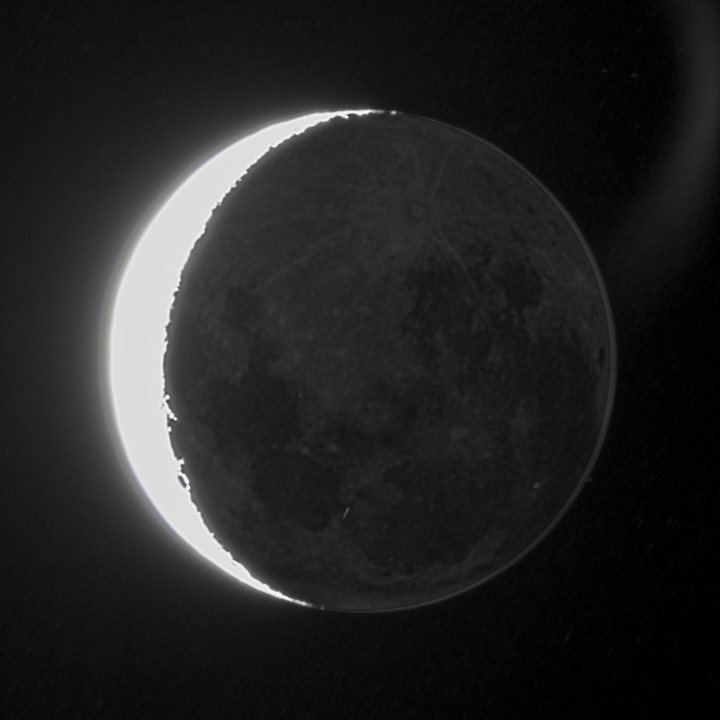
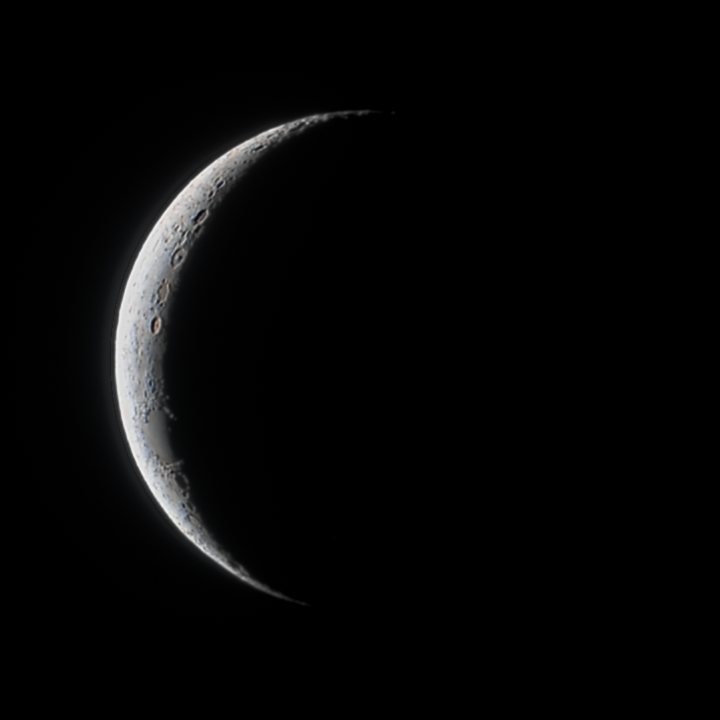
The crescent is in direct sunlight and the glow isn't, and the gap is too wide for one exposure. Expose for the glow and the crescent turns pure white. Expose for the craters and the dark side turns black. In the photos above, the crescent was 74% pure white in the long shot, and the dark side held nothing at all in the short one.
White areas have no detail left to recover, so no amount of editing fixes this afterwards. You need the second photo.
When should you shoot it?
- In the first few days after new Moon, low in the west after sunset, or in the last few days before it, low in the east before sunrise. Thin crescents show the strongest glow.
- Once the twilight has faded enough for the sky to be darker than the glow, but before the Moon gets too low. There is usually only a short window.
- On a clear night. A crescent is always fairly low, so you are already looking through a lot of air. Haze spreads the crescent's light over the dark side and hides the glow.
How do you take the two shots?
- Long shot, for the glow. Set your telescope's app so the dark side and its dark seas show. A pure white crescent is fine here.
- Short shot, for the crater detail. Lower the exposure and gain until the crescent shows craters and nothing is pure white. A black dark side is fine here.
- Keep everything else the same. Use the same telescope and the same image size, and take them a few minutes apart. Don't crop either photo.
Make the gap between the two big. In the example above, the long shot collected about 52 times the light of the short one. AstroSlide needs at least 2 times, and a bigger gap gives a better result.
No exact settings here, on purpose. The right values depend on your telescope, the phase and the sky, so use what you see on screen. If your app doesn't let you set exposure or gain, you can still get the glow from one long photo (see below).
Use the stacked file your telescope saves rather than one frame, because the glow is faint and a single frame is noisy. FITS is the best choice: it holds more of the faint tones than a JPEG. Seestar FITS files were about 12 MB each in our example, well within the 50 MB limit for two photos together.
Can you use just one photo?
Yes. AstroSlide looks for earthshine in every Moon photo, so a long shot on its own gets its glow brought out, and the app tells you it found it. The crescent stays overexposed, though: its white areas have no detail left. The app notes this and suggests a short shot for next time.
Is the glow real?
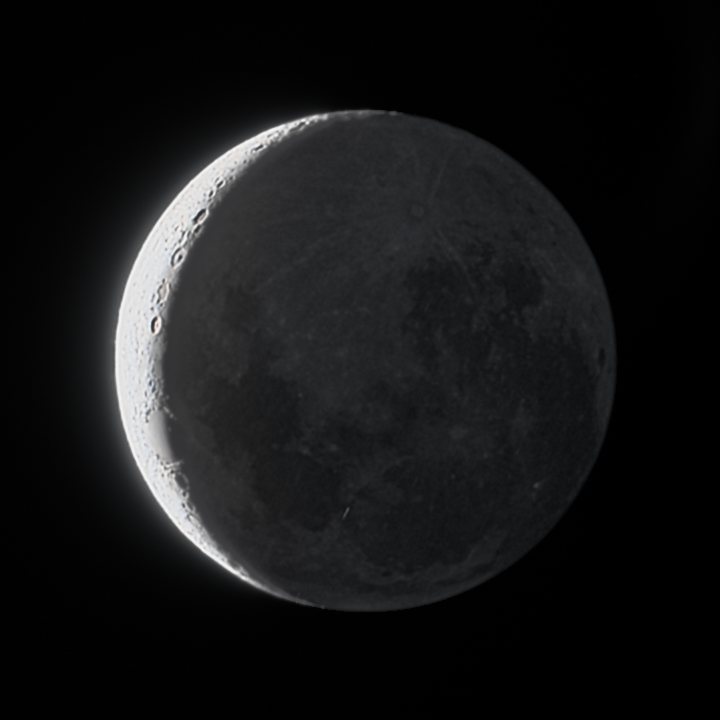
Yes. Both photos are real light from the same Moon, taken minutes apart, and the merged picture uses the glow from one and the crescent from the other. The brightness of each part is adjusted so both show at once.
The glow keeps its own natural colour. AstroSlide never boosts it, so it won't turn into a mineral Moon. The colour looks act on the sunlit crescent only, and more gently than usual, because a thin crescent has little colour to bring out.
Doing it in AstroSlide
- Open AstroSlide and add both photos at once: drag them in together, or select both when you tap to choose. The order doesn't matter, as the longer one is worked out for you.
- You'll see "2 photos of the same Moon". Press Enhance. The photos are lined up, turned to match if the view rotated between them, and combined. Both are uploaded to be processed and not kept.
- A note confirms it: "Used 2 photos: the crescent from the shorter one, the earthshine from the longer one."
- Set Earthshine glow under Tone to choose how bright the dark side shows. This slider only appears when earthshine is found. Brightness and Highlights start a little differently on these photos, to make the crescent brighter against the glow.
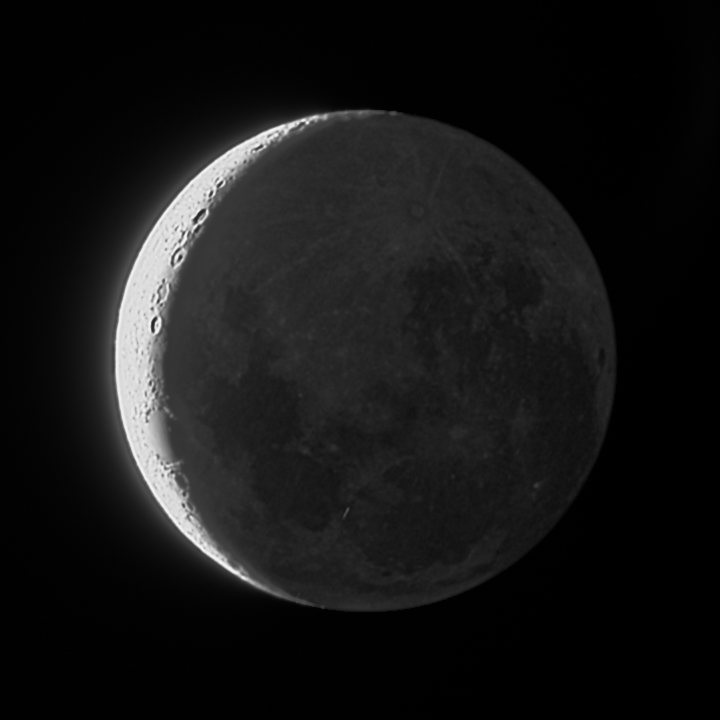
- Pick a look: Subtle, Medium or Strong. Or switch to Black & white and pick Soft, Crisp or Dramatic. These differ most on crescents, so they suit earthshine well.
- Open Labels if you want names on the picture. Names on the dark side are already on for an earthshine photo.
- Save as JPEG for sharing, or as 16-bit TIFF or PNG for further editing.
What if the photos don't combine?
You always get a picture. If the two can't be combined, the first photo is used and the note says why.
| The app says | What to do |
|---|---|
| They are different sizes | Use the original files from the same telescope, uncropped. |
| They were taken far apart | Keep the two shots within 30 minutes of each other. |
| They don't line up as the same Moon | Make sure both show the same Moon at the same size. |
| Both have about the same brightness | Make the short shot much shorter, or the long one much longer. |
| Part of the crescent is still overexposed | They were combined, but shorten that shot further next time. |
The traditional way
Experienced imagers stack many frames at each exposure, often more than two exposures, then blend them by hand in Photoshop or PixInsight using a mask. That gives you full control and can show more of the dark side than two photos can. It also takes practice and paid software. AstroSlide takes two photos and one press of a button, and suits you if you want a good picture rather than a project.
Tips and limits
- Lens reflections: a very bright crescent can leave a faint arc in the sky beside the Moon, as in the long shot above. AstroSlide reduces the sky's glare, but doesn't remove the arc itself.
- Frame the whole Moon: the dark side's circle is found from the crescent's edge, so leave sky around the Moon.
- This is a new feature: so far it has been tried on one pair of Seestar S30 stacks. If your photos from another telescope come out wrong, email hello@astroslide.me.