Home › Guides › Photograph the supermoon · 日本語
How to photograph the November 2026 supermoon
The Moon is full on Tuesday 24 November 2026 at 14:54 UTC, close to Earth and high in the northern sky. Shoot it on the 23rd or 24th, when it is well clear of the horizon, and record video rather than a single photo.
Updated 4 November 2026
When is the November full Moon?
The exact moment is 24 November 2026 at 14:54 UTC. To your eye the Moon looks full for about a day either side, so pick the clearest night.
- The Americas: the exact moment falls on the morning of the 24th, so the nights of the 23rd and the 24th are equally close.
- Europe and Africa: it is full in the afternoon of the 24th. Shoot that evening.
- Asia and Australia: it is full on the evening of the 24th (22:54 in Singapore, 23:54 in Tokyo). That night is best.
It is often called the Beaver Moon, a North American name, or the Frost Moon. In the southern hemisphere it is spring, so those names fit less well, but it is the same Moon.
Is it really a supermoon?
Mostly, yes. The Moon is 360,767 km away at full, about 24,000 km closer than average. That makes it about 6.5% wider and 13% brighter than an average full Moon. Most lists call that a supermoon. A few use a stricter cutoff and don't.
You won't see the difference by eye, and the Moon still looks huge near the horizon for a different reason: that is an illusion of the brain, not the distance. What you will notice in a telescope photo is a slightly bigger Moon on the same sensor, so a little more detail.
The next one is closer still. The Moon is full on 24 December 2026 at 01:28 UTC (the evening of the 23rd in the Americas) at 356,740 km, the closest full Moon of the year. Everything on this page works for that night too.
When does the Moon rise where you live?
A full Moon rises around sunset and is highest around midnight. Times are local and rounded to the minute.
| City | Rises 23 Nov | Rises 24 Nov | Highest |
|---|---|---|---|
| Los Angeles | 15:51 | 16:43 | 83° |
| New York | 15:30 | 16:16 | 76° |
| São Paulo | 17:48 | 18:58 | 39° |
| London | 14:45 | 15:18 | 65° |
| Berlin | 14:45 | 15:16 | 63° |
| Mumbai | 16:44 | 17:38 | 83° |
| Singapore | 17:35 | 18:35 | 65° |
| Jakarta | 16:34 | 17:37 | 58° |
| Tokyo | 15:05 | 15:49 | 80° |
| Sydney | 18:20 | 19:35 | 30° |
"Highest" is the Moon's height above the horizon around midnight on the 24th. This Moon is in Taurus, so it rides high from the northern hemisphere and lower from the southern one.
When should you shoot it?
- For a close-up of the Moon: shoot when it is high, at least 30° up and ideally near midnight. Low down you look through much more air, so the Moon shimmers and gets a blue and a red fringe on opposite edges. A high November Moon is a good chance for northern observers.
- For a big Moon over a landscape: shoot at moonrise, in the half hour when the sky is still blue. The Moon and the land are then close enough in brightness to fit one exposure.
- Watch the haze. Thin cloud puts a glow around the Moon and dims its detail. AstroSlide removes the glow, but it can't bring back the lost contrast.
How do you take a sharp photo of it?
With a smart telescope (Seestar, Dwarf)
Use lunar mode and record video, not a single photo. Clips of 30 seconds to 2 minutes, back to back, work well. Stacking the sharpest frames removes most of the shimmer and the noise, and that is what lets the colour come out later. A full Moon is bright, so keep the brightest craters, like Tycho and Copernicus, just below pure white. How to film the Moon with a Seestar covers this step by step.
With a phone
- Turn night mode off and tap the Moon, then lower the exposure until you see the dark seas. Phones expose for the dark sky and burn the Moon white.
- Hold the phone still: a small tripod, or rest it on a wall. Use the timer so your tap doesn't shake it.
- Don't zoom past your longest lens. Beyond it the phone only enlarges pixels. A phone held to a telescope or binocular eyepiece does much better.
- Take a short video rather than one photo, if your phone lets you set exposure for video. AstroSlide can stack it.
With a camera and telephoto lens
Start around 1/250 s, f/8 and ISO 200 and adjust from the histogram: the bright highlands should stay just below the right edge. Use the longest lens you have, a tripod and a remote release. Take a burst of 20 or more frames, because the air sharpens and blurs from moment to moment.
Why is full Moon good for colour?
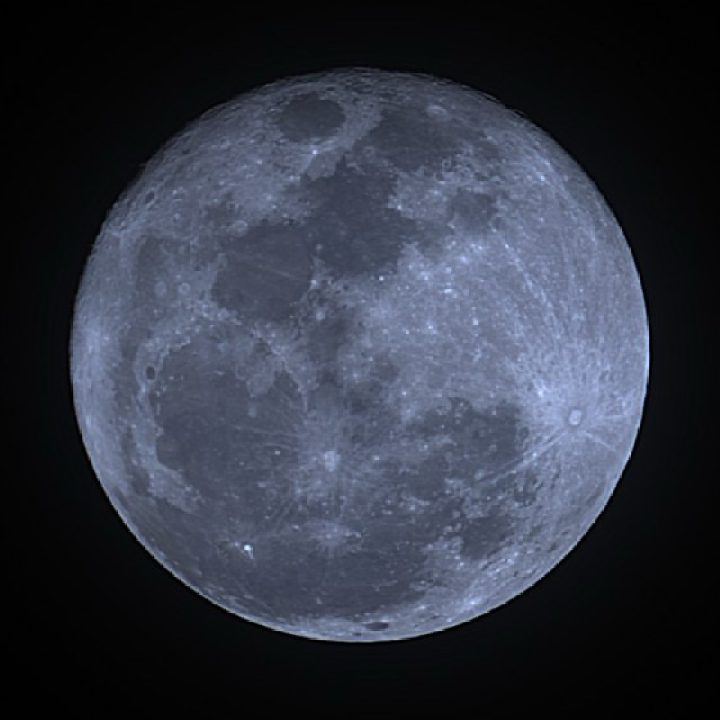
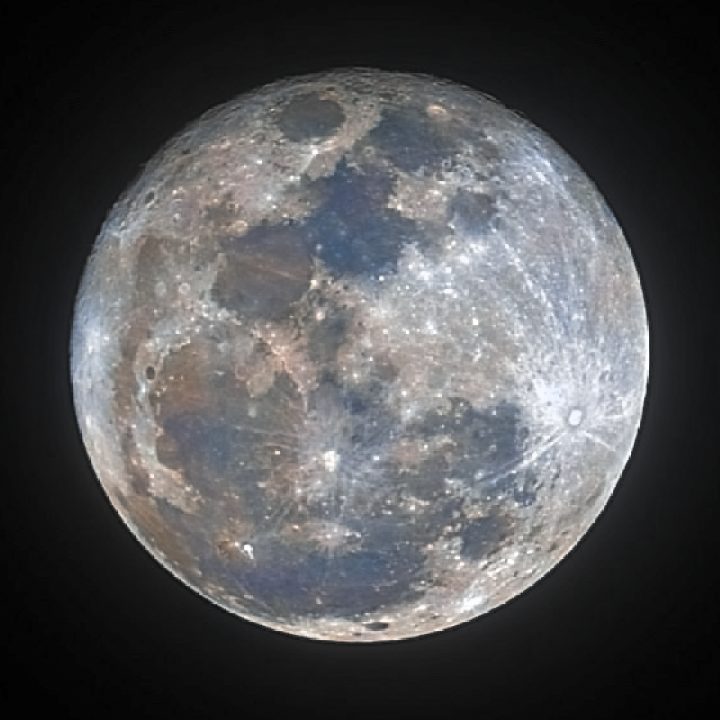
At full Moon the Sun lights every mare head-on. There are almost no shadows, so the surface looks flat in grey. But it is the best phase for a mineral Moon. Titanium-rich lava plains are very slightly blue and iron-rich ones very slightly orange, and with every mare lit at once you see the whole pattern.
These colours are real but faint, a few percent. AstroSlide boosts the colour that is in your photo and never adds any. A black-and-white photo stays black and white.
Doing it in AstroSlide
- Open AstroSlide and add your Moon: a photo (JPEG, PNG, TIFF or FITS, up to 50 MB) or video clips (MP4, MOV, MKV, Seestar RAW AVI or SER). Add several clips from the same night together.
- For video, press Stack. The sharpest frames are lined up and stacked into one 16-bit image, which opens in the editor.
- Press Enhance and pick a look: Subtle, Medium or Strong. Or switch to Black & white for a sharp grey Moon.
- Fine-tune with the sliders. They run in your browser, so changes show straight away.
- Press Share to frame it as a Square for posting, or Download a JPEG, or a 16-bit TIFF or PNG for further editing.
It is free and runs in your browser. Nothing to install, and your photos and videos are not kept.
Tips and limits
- Frame the whole Moon with sky around it. AstroSlide finds the Moon's edge to measure the blur, and frames where it touches the edge are skipped when stacking.
- A wide landscape with a small Moon isn't what AstroSlide is made for. It works on close-ups where the Moon is a clear disc.
- A single phone photo is noisy. It will sharpen, but stacked video gives much cleaner colour.
- Copy files straight from the telescope, not through WhatsApp or similar apps, which shrink and recompress them.